SMS Terms & Opt-In Disclosure
Last Updated: March 12, 2026
Sterling Home Tech Inc. (“Sterling”) operates a property management platform at sterlinghome.xyz. This page describes our SMS messaging program, how users opt in, and how to opt out.
How Users Opt In
SMS notifications are disabled by default. No messages are sent until the user explicitly opts in through the Sterling web application. Consent is collected exclusively through the in-app notification settings: there is no other opt-in method.
Step 1: User Opens Notification Settings
After signing in at sterlinghome.xyz, the user navigates to Settings > Notifications. The SMS toggle is off by default and only appears when the user has a phone number on their profile.
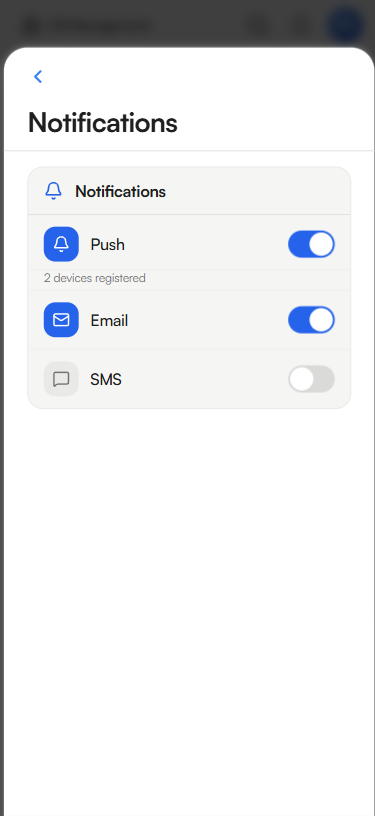
Notification settings screen: SMS is off by default
Step 2: Consent Dialog Appears
When the user toggles SMS on, a consent dialog is displayed. The user must tap “I Agree” to proceed: no messages are sent without this explicit action.
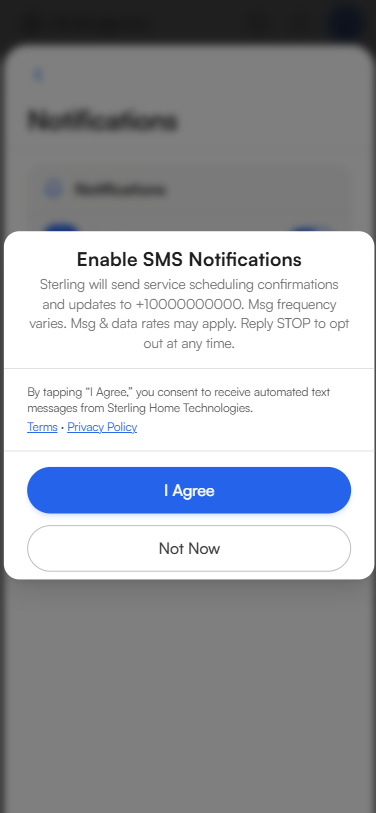
Consent dialog shown when the user toggles SMS on
Step 3: SMS Enabled After Consent
After tapping “I Agree,” SMS is enabled and the user’s phone number is displayed. Consent is timestamped in the user’s account record.
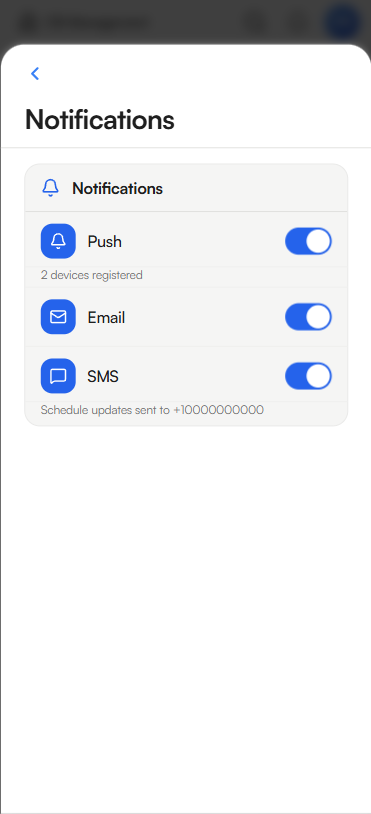
SMS enabled: schedule updates will be sent to the user’s phone number
The consent dialog includes links to our Terms of Service and Privacy Policy.
How to Opt Out
You can stop receiving SMS messages at any time by either method:
- Reply STOP to any message from Sterling. You will receive a one-time confirmation: “You have been unsubscribed from Sterling SMS notifications. No more messages will be sent. Reply HELP for help.”
- Disable the SMS toggle in your account at sterlinghome.xyz under Settings > Notifications
After opting out, you will continue to receive notifications through other enabled channels (email, push) unless you disable those separately. You can re-enable SMS at any time by repeating the opt-in process.
Help
Reply HELP to any SMS message from Sterling for assistance. You will receive a reply with support contact information.
You can also contact us directly:
- Email: support@sterlinghome.xyz
- Website: sterlinghome.xyz/support
Program Description
Sterling sends transactional SMS notifications to homeowners and property managers who use our platform. Messages are limited to service-related updates: we do not send marketing, promotional, or advertising messages.
Message types include:
- Service request updates (new, scheduled, completed)
- Appointment confirmations and reminders
- New message alerts from property managers or contractors
- Account notifications requiring action
Sample Messages
Service Request Update
New Plumbing service request at 1234 E Camelback Rd. View details: https://sterlinghome.xyz/management/pm/requests
Scheduling Confirmation
Confirmed: HVAC service scheduled for Jan 21 at 9 AM. 1234 E Camelback Rd
New Message Alert
New message from John: “Leak in kitchen sink”. Reply: https://sterlinghome.xyz/messages
Message Frequency
Message frequency varies based on service activity. Typically 1–5 messages per month. You may receive more during active service periods or none during inactive periods.
Message & Data Rates
Message and data rates may apply. Standard messaging rates from your wireless carrier apply. Sterling is not responsible for any charges from your carrier.
Supported Carriers
SMS messages are supported on all major U.S. wireless carriers including AT&T, T-Mobile, Verizon, and others. Carriers are not liable for delayed or undelivered messages.
Privacy
Your phone number and SMS consent data are used solely for delivering service notifications. We do not sell, rent, or share your phone number with third parties for marketing purposes. Phone numbers are shared only with our SMS delivery provider, Twilio, for the purpose of message delivery.
For full details on how we handle your data, see our Privacy Policy. SMS-specific data practices are detailed in Section 3.3.
Related Policies
- Privacy Policy - how we collect, use, and protect your data
- Terms of Service - full terms including SMS program details (Section 5)