Contractor Job Texts
Opt-in and terms · Updated Oct 28, 2026
Sterling Home Tech Inc. (“Sterling”) runs a property management platform at sterlinghome.xyz. Property managers use Sterling to hire contractors (pool, plumbing, HVAC and other trades) for the homes they manage. This page describes the text messages Sterling sends to those contractors on the manager’s behalf, how a contractor agrees to them, and how a contractor stops them. Texts to homeowners and managers are a separate program, described at sterlinghome.xyz/sms.
What these texts are: two-way job conversations. A manager writes to a contractor about a job in the Sterling app, and the contractor gets it as a text from a Sterling number. The contractor’s reply goes back to that manager. Messages are about the contractor’s jobs only: scheduling, access, questions and updates. No marketing or promotional messages are ever sent.
How a Contractor Agrees to Job Texts
Sterling never texts a contractor’s number without that contractor’s own agreement on record. The contractor always starts it themselves, on this page or by texting START. Sterling stores the time, the method, the number and the exact words shown.
Way 1: The form on this page
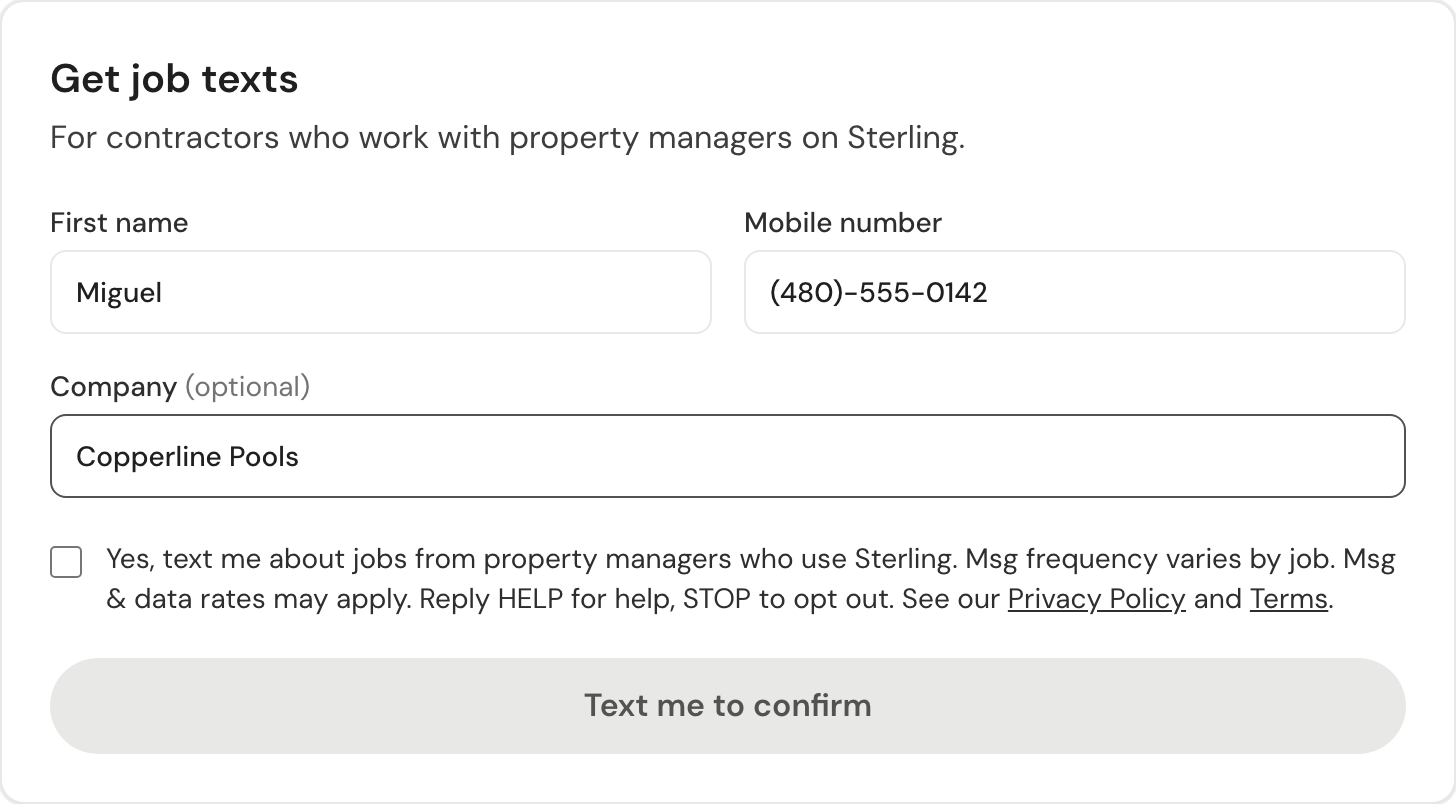
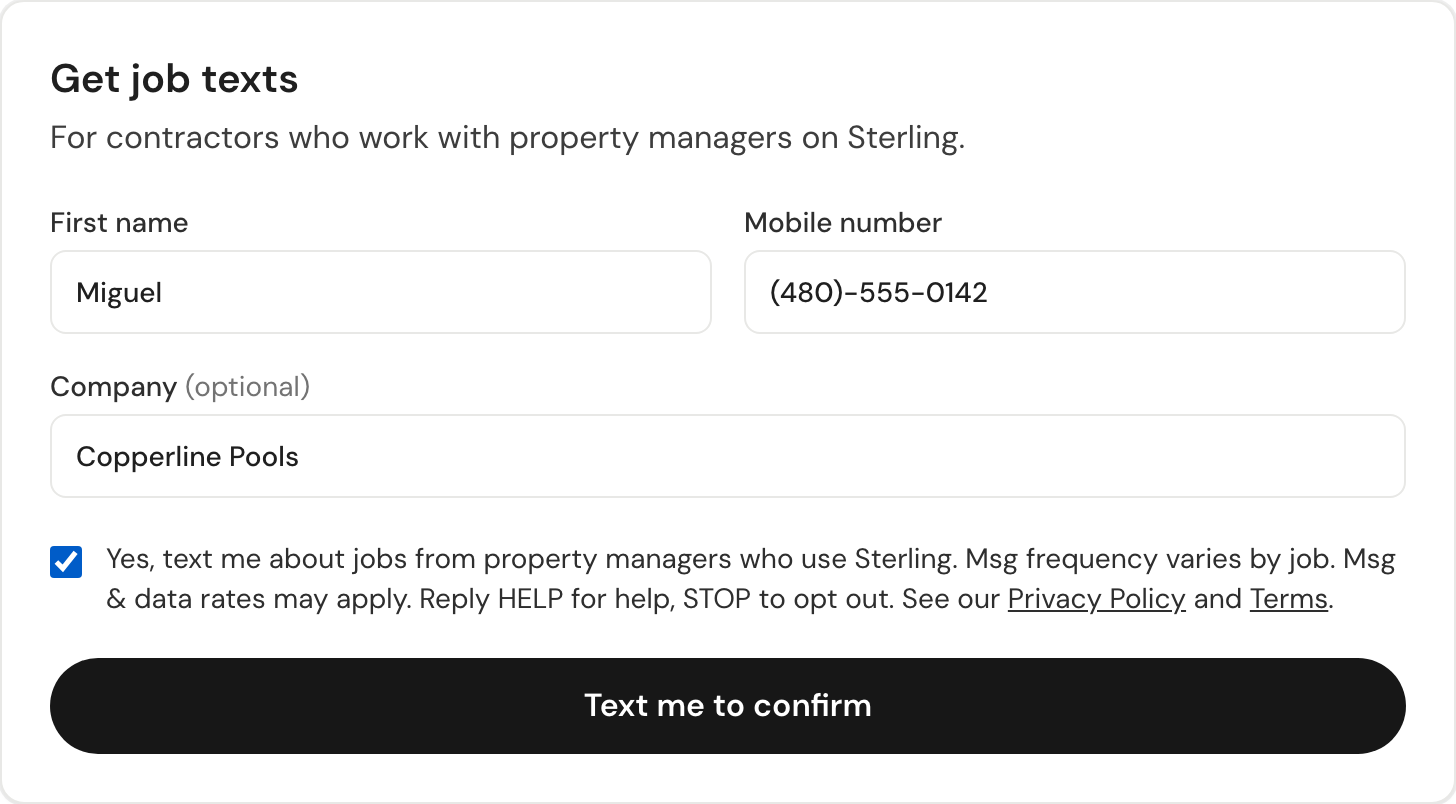
The contractor enters their first name and mobile number, and ticks a box that is unticked by default. The box reads:
“Yes, text me about jobs from property managers who use Sterling. Msg frequency varies by job. Msg & data rates may apply. Reply HELP for help, STOP to opt out. See our Privacy Policy and Terms.”
The button stays off until the box is ticked. Sterling then sends one text, and records consent only when the contractor replies YES:
The one confirmation text
Sterling: reply YES to confirm job texts from property managers who use Sterling. Msg frequency varies. Msg & data rates may apply. Reply HELP for help, STOP to opt out.
Way 2: Texting START
A contractor can opt in at any time by texting START to any Sterling job number themselves.
Sterling never texts first
A manager cannot agree for a contractor. When a manager writes to a contractor whose number has no agreement on record, Sterling sends nothing to that number. The manager is shown this page’s link to pass to the contractor themselves, and the message is held until the contractor has opted in here or by texting START.
After YES or START the contractor gets this confirmation:
Opt-in confirmation (sample)
Sterling: you're set for job texts from Saguaro Home Care. Just reply to a text to answer them. Msg frequency varies by job. Msg & data rates may apply. Reply HELP for help, STOP to opt out.
Why There Are Several Sterling Numbers
Each job conversation between a manager and a contractor texts from its own Sterling number, so the contractor’s phone shows one thread per job and a reply reaches the right job without asking “which job is this about?”. The numbers exist to keep conversations separate, not to send more messages: every number sends only the job conversation it belongs to, to contractors who have agreed as described above. A STOP sent to any Sterling number stops every Sterling job text to that phone.
Sample Messages
Names, addresses and links below are examples.
A message about a job
Dana (Saguaro Home Care) about 1234 E Camelback Rd: The filter is leaking again. Can you come Thursday at 9?
A follow up
Dana (Saguaro Home Care) about 1234 E Camelback Rd: Gate code is 4417. Homeowner is away until Friday.
When a reply could be about two jobs
You have 2 open jobs with Dana (Saguaro Home Care). Which home is this about? Reply with just the letter: A) 1234 E Camelback Rd (pool filter) B) 88 N Palo Verde Dr (irrigation leak)
When two people at the contractor were texted
Miguel answered Dana: "Thursday 9am works." No need to reply.
Message Frequency
Message frequency varies by job. Texts are sent only when a manager writes to the contractor about a job they are working on, or in answer to the contractor’s own reply.
Message & Data Rates
Msg & data rates may apply. Standard rates from the contractor’s wireless carrier apply. Sterling is not responsible for carrier charges.
How to Opt Out
- Reply STOP (or STOPALL, UNSUBSCRIBE, CANCEL, END, QUIT) to any Sterling job text. One confirmation is sent and no further job texts go to that phone from any Sterling number.
- Ask the manager to remove the number, or email support@sterlinghome.xyz.
Reply START to opt back in.
Help
Reply HELP to any Sterling job text. The reply is:
HELP reply
Sterling job texts: your replies go to the manager who texted you. Help: support@sterlinghome.xyz. Reply STOP to opt out.
Or contact support@sterlinghome.xyz or visit sterlinghome.xyz/support.
Supported Carriers
Supported on all major U.S. carriers, including AT&T, T-Mobile and Verizon. Carriers are not liable for delayed or undelivered messages.
Privacy
A contractor’s phone number and consent record are used only to deliver these job texts. Sterling does not sell, rent or share mobile numbers or SMS consent with third parties or affiliates for marketing or promotional purposes. Numbers are shared only with our SMS provider, Twilio, to deliver the messages. See the Privacy Policy, Section 3.3 and the Terms of Service, Section 5.